> For the complete documentation index, see [llms.txt](https://docs.wcproducts.com/welcome/llms.txt). Markdown versions of documentation pages are available by appending `.md` to page URLs; this page is available as [Markdown](https://docs.wcproducts.com/welcome/competitive-concepts/wcp-cc-2026/assembly-instructions/drivetrain.md).
# Drivetrain
{% hint style="success" %}
Vibra-TITE VC-3 Threadmate ([Vibra-TITE](https://wcproducts.com/products/threadlocker)) is recommended on all bolts that thread into a tapped hole.
{% endhint %}
## Step 1
Refer back to the Swerve X2 Manual to build the two Right and two Left configurations of the Tube Mount X2c modules.
{% hint style="warning" %}
Ensure that two Left-Hand and two Right-Hand modules are assembled
{% endhint %}
Swerve X2c - Right, Tube Mount
Swerve X2c - Left, Tube Mount
## Step 2
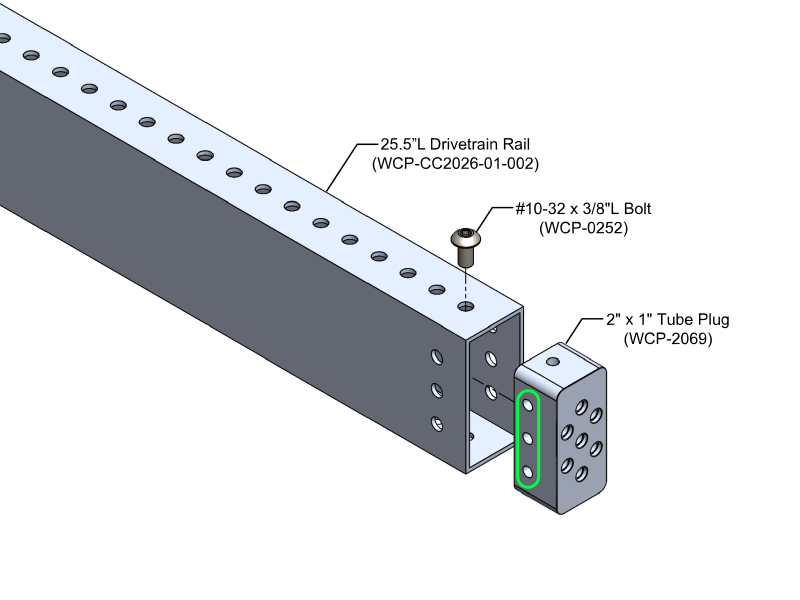
Install Tube Plugs into all of the Drivetrain tubing as shown below using #10-32 x 3/8"L Bolts.
{% tabs %}
{% tab title="25.5"L Drive Rail" %}
Install a 2" x 1" Tube Plug into each end of the 25.5"L Drive Rails using #10-32 x 3/8"L bolts as shown below. Additional bolts will be added in later assembly steps.
{% hint style="success" %}
The highlighted holes on the Tube Plug must be drilled out to 0.201".
Drilling these holes allows the frame to be bolted together without threading a bolt through multiple Tube Plugs, removing the risk of cross-threading.
{% endhint %}
{% endtab %}
{% tab title="25"L Drive Rail" %}
Install a 2" x 1" Tube Plug into each end of the 2"L Drive Rails using #10-32 x 3/8"L bolts as shown below. Additional bolts will be added in later assembly steps.
{% endtab %}
{% tab title="16.5"L Crossbar Supports" %}
Install a 1" x 1" Tube Plug into each end of the 16.5"L 1" x 1" Crossbar Support Rails using one #10-32 x 3/8"L bolt as shown below. Additional bolts will be added in later assembly steps.
{% endtab %}
{% tab title="23.5"L Crossbar Supports" %}
Install a 1" x 1" Tube Plug into each end of the 23.5"L 1" x 1" Crossbar Support Rails using one #10-32 x 3/8"L bolt as shown below. Additional bolts will be added in later assembly steps.
{% endtab %}
{% endtabs %}
## Step 3
Bolt together the Crossbar Support Tubes from Step 2 using #10-32 x 1-1/4"L bolts as shown below.
## Step 4
Bolt together the Drivetrain tubes from Step 2 to the assembly from Step 3 using #10-32 x 1-1/4"L bolts as shown below.
{% hint style="warning" %}
If the 2" x 1" Tube Plug holes on the 25.5"L drivetrain rails were not drilled out in Step 2, return to that step and drill out the selected holes before bolting the frame together.
{% endhint %}
## Step 5
Install the modified 90 Degree Corner gussets using #10-32 x 3/8"L bolts as shown below.
## Step 6
Bolt the Belly Pan to the Bottom of the assembled Drivetrain
Rivet the Belly Pan to the Bottom of the assembled Drivetrain from Step 3 using .250" - .438" Grip Length, 3/16" Rivets ([WCP-0450](https://wcproducts.com/products/rivets))
## Step 7
Use this step to mount your desired electronics.
{% hint style="warning" %}
The images below can be used ***ONLY IF THE SAME ELECTRONICS*** are used.
{% endhint %}
{% tabs %}
{% tab title="Pigeon 2.0" %}
Mount the Pigeon 2.0 to the Pigeon Mounting Plate using #4-40 x 1/2"L bolts. ([McMaster P/N 91251A110](https://www.mcmaster.com/91251A110/))
{% hint style="info" %}
Teams can choose to not tap the Pigeon Mounting plate and rather drill the holes to 1/8". If this is done a #4-40 x 3/4"L bolt ([McMaster P/N 91251A113](https://www.mcmaster.com/91251A113/)) and #4-40 Nut ([McMaster P/N 90631A005](https://www.mcmaster.com/90631A005/)) can be used to mount the Pigeon.
{% endhint %}
{% endtab %}
{% tab title="PDP 2.0" %}
Mount the PDP 2.0 to the Belly Pan using #10-32 x 2-1/4"L bolts and 1-1/2"L Spacers as shown below.
{% endtab %}
{% tab title="VRM" %}
Mount the VRM using #6-32 x 1/2"L bolts ([McMaster P/N 91251A148](https://www.mcmaster.com/91251A148/)).
{% endtab %}
{% tab title="CANivore" %}
Bolt the CANivore to the Printed CANivore mount using #4-40 x 5/8"L bolts as shown below.
Once this is done, mount the CANivore to the roboRIO using #4-40 x 3/8"L bolts (McMaster P/N) as shown below.
{% endtab %}
{% tab title="roboRIO 2.0" %}
Use large zipties ([WCP-0437](https://wcproducts.com/products/zipties)) to mount the roboRIO to the Belly Pan.
{% endtab %}
{% endtabs %}
## Step 8
Mount the Horizontal Battery Box to the Drivetrain using #10-32 x 3/8"L bolts and .125" - .250" Grip Length, 3/16" Rivets ([WCP-0449](https://wcproducts.com/products/rivets)) as shown below.
{% hint style="info" %}
The Main Breaker can be mounted ANYWHERE
{% endhint %}
## Step 9
Mount the assembled Swerve X2c modules from Step 1 using the #10-32 x 2-1/2"L bolts from the Swerve Base Kits.
## Step 10
Install the WCP Cone Bumper Mounts.
---
# Agent Instructions
This documentation is published with GitBook. GitBook is the documentation platform designed so that both humans and AI agents can read, navigate, and reason over technical content effectively. Learn more at gitbook.com.
## Querying This Documentation
If you need additional information that is not directly available in this page, you can query the documentation by asking a question.
Perform an HTTP GET request on the following URL with the `ask` and `goal` query parameters:
```
GET https://docs.wcproducts.com/welcome/competitive-concepts/wcp-cc-2026/assembly-instructions/drivetrain.md?ask=&goal=
```
`ask` is the immediate question: it should be specific, self-contained, and written in natural language.
`goal` is what the user is ultimately trying to achieve, the reason they need the answer. Sharing it helps GitBook give you a better, more relevant answer. A goal is most helpful when it describes the outcome the user wants rather than restating the question. For example, with `ask=how do I create an API token`, a goal like `automate deployments from our CI pipeline` lets GitBook tailor the answer to that use case.
The response will contain a direct answer to the question and relevant excerpts and sources from the documentation.
Use this mechanism when the answer is not explicitly present in the current page, you need clarification or additional context, or you want to retrieve related documentation sections.
%2C%20Tube%20Mount.svg?alt=media&token=d010f7a9-e2dc-4e56-9868-fdd8966fd875)
%2C%20Tube%20Mount.svg?alt=media&token=99f769aa-b53f-4227-b0f1-8e8afb969474)